

Close Menu
FintechTodayNews

    Subscribe to Updates

    Get the latest creative news from FooBar about art, design and business.

    Facebook X (Twitter) Instagram
    Facebook X (Twitter) Instagram
    FintechTodayNewsFintechTodayNews
    Subscribe
    • Home
    • Fintech News
    • Startups
    • Trends & Insights
    • Cryptos
    • Banking system
    • About Us
    • Contact Us
    FintechTodayNews
    Home - Useful WhatsApp Features You Might Not Know
    Consumer Tech

    Useful WhatsApp Features You Might Not Know

    FinTech TodayBy FinTech TodayDecember 4, 2025Updated:December 4, 2025No Comments3 Mins Read
    Facebook Twitter Pinterest LinkedIn Telegram Tumblr Email
    Useful WhatsApp Features You Might Not Know
    Useful WhatsApp Features You Might Not Know
    Share
    Facebook Twitter LinkedIn Pinterest Email

    Useful WhatsApp Features You Might Not Know

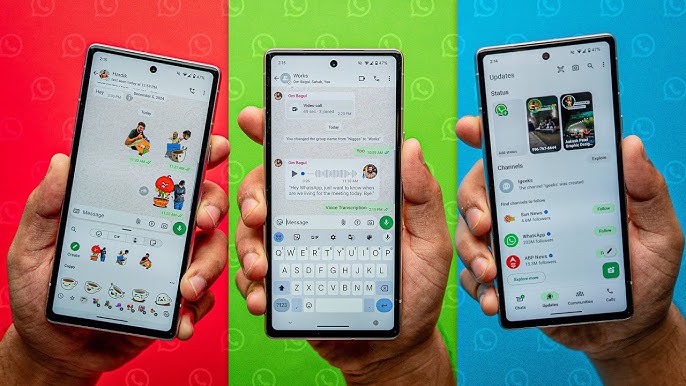
    • Lock individual chats — you can hide a chat behind a passcode, Face ID / fingerprint, or biometric lock so that only you can open it. (mint)
    • Self-destructing / Disappearing messages — messages in a chat or group can be set to auto-delete after a given period. (وردنا)
    • Voice-note transcription — when you receive audio voice notes, WhatsApp can transcribe them to text so you can read instead of listening (especially useful when you’re in public).
    • Silence unknown callers — you can silence calls from unsaved or unknown numbers to reduce spam or unwanted contacts.
    • Scan and send documents directly — instead of using a separate scanner app, you can scan documents and send them via WhatsApp.
    • Customise chat appearance — themes, backgrounds, chat-specific styling — for example, you can set different backgrounds or themes per chat to personalise your experience. (factalive.com)
    • Use custom stickers (and photo-stickers) — you can create stickers from your own photos or gallery to share in chats.
    • Pin / Star important chats and messages — pinning keeps a chat at the top of your list; starring messages lets you bookmark them for easy retrieval. (How-To Geek)
    • Search within a specific chat — instead of searching all chats, you can limit search results to one chat to find particular messages.
    • Use WhatsApp on multiple devices (linked devices / desktop / web) — you don’t need your phone always online; you can link a computer or tablet and continue chats there.
    • Format text (bold, italics, strikethrough) — you can style your messages easily using simple markup (e.g. *bold*, _italics_, ~strikethrough~). (Gadgets 360)
    • Hide “Last Seen” or read receipts / online status — you can prevent others from seeing when you last used WhatsApp, or whether you’ve read their messages. (The Independent)
    • Custom notification settings per chat / group — set different notification sounds or mute specific chats/groups (for hours, days or even a year).
    • Share live location or regular location — useful when meeting someone or letting someone track your commute safely.
    • View message details (delivery/read time) — you can check when a message was delivered and when it was read (or opened).
    • Restore messages or recover mistakenly deleted messages (in some cases / where supported) — there are tools/options to recover certain deleted messages or chats.
    • Dual accounts / multi-account support (on some phones) — lets you have two WhatsApp accounts on one device — handy if you juggle work and personal life.
    • Use built-in (or AI-powered) assistants / tools like voice-to-text, quick replies, or Meta-AI features (depending on your version and region) — for smarter messaging.
    • Customize privacy and blocking settings for statuses, media auto-save, read receipts — you can control who sees your status, whether media go straight to gallery, etc.
    • Use a dedicated PIN or biometric lock for WhatsApp itself — adding security at the app level, not just chat-by-chat. (watsapk.com)
    See also  SASSA December 2025 Payment Dates & Amounts: Full Schedule + R370 SRD Update

    🧠 Why These Features Matter

    • They improve privacy and control — things like read-receipt hiding, disappearing messages, locked chats let you manage who sees what and for how long.
    • They increase convenience and flexibility — features like document scanning, multi-device support, message formatting, voice-note transcription make messaging easier, quicker and more powerful.
    • They let you organise and personalise — from pinning chats to custom themes and stickers; you can make WhatsApp fit your style and needs.
    • They help for work and productivity — dual accounts, multi-device support, quick search, chat-locking, document scanning, etc. make WhatsApp useful beyond just chatting.
    Related Posts:

    • 5 interesting ways to transfer files from Android to iPhone
      interesting ways to transfer files from Android to iPhone
    • 5 Interesting Ways to Transfer Files from Android to iPhone
      5 Interesting Ways to Transfer Files from Android to iPhone
    • Nigeria Overhauls National ID System: 124 Million NINs Face MOSIP Migration Risk
      Nigeria Overhauls National ID System: 124 Million…
    • How Tax Affects Small Businesses in Nigeria
      How Tax Affects Small Businesses in Nigeria
    app features chat settings digital communication FintechTodayNews hidden WhatsApp features messaging apps mobile apps privacy settings smartphone apps tech guide tech tips WhatsApp WhatsApp features WhatsApp tricks WhatsApp update
    Share. Facebook Twitter Pinterest LinkedIn Tumblr Email
    FinTech Today
    • Website

    Related Posts

    Can You Be Taxed Without a Bank Account in Nigeria?

    January 29, 2026

    PayPal Is Coming Back to Nigeria – But Young Nigerians Have Already Moved On

    December 19, 2025

    How Nigerians Can Save Smarter With OPay Spend & Save Feature

    December 15, 2025

    Should the UK Adopt an Under-16s Social Media Ban? Experts Weigh In

    December 13, 2025

    Infinix X Davido Launch “Make A Wish” Christmas Promo – Win Gifts & N10 Million Dream Wish

    December 10, 2025

    CAC to Shut Down Unregistered PoS Operators by January 2026

    December 8, 2025
    Leave A Reply Cancel Reply

    MENU
    • Home
    • Fintech News
    • Startups
    • Trends & Insights
    • Cryptos
    • Banking system
    • About Us
    • Contact Us
    Recent Posts
    • Best Savings Apps in Nigeria (2026 Edition)
    • SCOA Soars 437% in 2026: N7 to N38 – What Investors Should Know
    • US Strikes on Iran: What It Means for Africa and Nigeria’s Economy

    Get ₦1,000 FREE Cash!

    Sign up with my link & get instant bonus

    Claim ₦1,000 Now →

    OPay – Free Transfers

    Unlimited free transfers + huge bonuses

    Join OPay Now →

    25 Free Transfers Monthly

    The real bank of the free

    Open Kuda Account →

    ₦500 Per Referral

    Best POS & Business App 2025

    Start Earning →

    Top Fintech Apps in Nigeria

    1. Kuda – Digital banking & budgeting

    2. FairMoney – Loans & savings

    3. OPay – Payments & wallet

    4. PalmPay – Cashless payments & bill pay

    5. Moniepoint – Business banking & POS

    6. Carbon – Loans & investments

    7. Branch – Micro-loans

    8. ALAT by Wema – Digital bank

    9. Zenith Bank App – Commercial bank digital

    10. GTWorld – Commercial bank app

    NGX + CRYPTO LIVE
    DANGCEM ₦645.00 ▲2.4% MTNN ₦212.50 ▼1.1% GTCO ₦52.80 ▲3.2% BUA FOODS ₦378.00 ▲1.8% AIRTEL ₦1,980 ▲0.9% Bitcoin $92,150 ▲5.7% Ethereum $3,840 ▲4.2%
    Updated every minute • FintechTodayNews

    Subscribe to Updates

    Get the latest creative news from FooBar about art, design and business.

    Latest Posts

    Best Savings Apps in Nigeria (2026 Edition)

    March 2, 2026

    SCOA Soars 437% in 2026: N7 to N38 – What Investors Should Know

    March 2, 2026

    US Strikes on Iran: What It Means for Africa and Nigeria’s Economy

    March 2, 2026

    Naira Closes February Stronger at N1,368.5/$ as CBN Sustains Monetary Tightening

    March 2, 2026
    Trending Posts
    Top Posts

    How Nigerians Can Save Smarter With OPay Spend & Save Feature

    December 15, 2025

    CBN Financial Inclusion & Monetary Stability at 2025 Awka Fair – Key Takeaways & Updates

    November 24, 2025

    Bank78 Launches Private Digital Bank to Transform Nigeria’s Banking

    November 29, 2025
    Don't Miss

    Best Savings Apps in Nigeria (2026 Edition)

    March 2, 2026

    1. FairMoney – Highest Potential Returns (Promo + Fixed Plans) Interest: Up to promotional ~30%…

    SCOA Soars 437% in 2026: N7 to N38 – What Investors Should Know

    March 2, 2026

    US Strikes on Iran: What It Means for Africa and Nigeria’s Economy

    March 2, 2026

    Naira Closes February Stronger at N1,368.5/$ as CBN Sustains Monetary Tightening

    March 2, 2026
    Stay In Touch
    • Facebook
    • YouTube
    • TikTok
    • WhatsApp
    • Twitter
    • Instagram
    Latest Reviews
    FinTech TodayNews
    FinTech TodayNews

    About Us
    Learn how FintechTodayNews covers Nigeria’s fintech scene – from app bonuses and startup spotlights to crypto updates and economic insights in 2025.”
    At FintechTodayNews, our news is built on real testing and community feedback. We cover the full spectrum of fintech in Nigeria: app reviews with actual bonuses, startup stories like SparkBorders, crypto rallies, NGX stock picks, and CBN policies. Every article is researched, unbiased, and designed to help you make money.

    Facebook X (Twitter) Instagram Pinterest YouTube WhatsApp

    Subscribe to Updates

    Get the latest creative news from FooBar about art, design and business.

    Most Popular

    How Nigerians Can Save Smarter With OPay Spend & Save Feature

    December 15, 2025

    CBN Financial Inclusion & Monetary Stability at 2025 Awka Fair – Key Takeaways & Updates

    November 24, 2025

    Bank78 Launches Private Digital Bank to Transform Nigeria’s Banking

    November 29, 2025
    FintechTodayNews
    Facebook X (Twitter) Instagram YouTube WhatsApp
    • Disclaimer
    • Terms & Conditions
    • DMCA / Copyright Notice
    • About Us
    • Help Center
    • Privacy Policy
    @ 2026 fintechtodaynews

    Type above and press Enter to search. Press Esc to cancel.