


Photoshop Crashing vs Final_design-Recovered.psd – The Designer’s Survival Story in 2025
By Osundaro Daniel Oluwafem | November 22, 2025
Every graphic designer in Nigeria knows the feeling. You’ve spent six hours on a client logo. Layers are perfectly named. The colour palette is singing. You’re one Ctrl+S away from perfection…
…and Photoshop just explodes. The screen freezes.
The rainbow wheel of death appears.
Your heart rate hits 180 bpm. You whisper the ancient designer prayer:
“Please… let auto-recovery be my friend today. ”And then, like a Nollywood hero walking out of fire untouched, one file rises from the ashes:
…and Photoshop just explodes. The screen freezes.
The rainbow wheel of death appears.
Your heart rate hits 180 bpm. You whisper the ancient designer prayer:
“Please… let auto-recovery be my friend today. ”And then, like a Nollywood hero walking out of fire untouched, one file rises from the ashes:
Final_design-Recovered.psdUnbothered.
Unscathed. Ready to render.
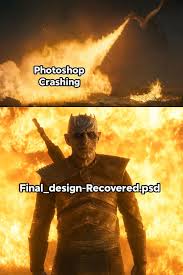
The Two Images Every Nigerian Designer Understands in Their Soul
Top Image – “Photoshop Crashing”
A massive fireball. Pure chaos. This is the exact moment your soul leaves your body when you see the “Adobe Photoshop has stopped working” pop-up at 2:17 a.m. while rushing a client job for morning presentation.
Bottom Image – “Final_design-Recovered.psd”
The calm, confident hero walking through flames like he owns them. This is the recovered file that opens perfectly, with every layer, mask, and smart object intact. You don’t even check the clock. You just hit Save As and thank the universe.
Why This Meme Hits Harder in Nigeria
In 2025, Nigerian designers are running Photoshop on:
- Laptops with 8GB RAM that sound like aircraft turbines
- NEPA that cuts at the worst possible moment
- MTN data that dies mid-render
- Clients who pay ₦50k but want “small changes” 47 times
So when Photoshop crashes, it’s not just software failing. It feels like destiny is personally against you.
Yet somehow, someway, Final_design-Recovered.psd always returns.
No corruption. No missing fonts. No “where is my smart object?!”
Real Talk: How to Make Auto-Recovery Your Best Friend in 2025
Want to increase your chances of survival? Here are the settings every Nigerian designer should use:
- Auto-Recover Every 5 Minutes (Not 10)
Edit → Preferences → File Handling → Automatically Save Recovery Information Every: 5 minutes -
Keep Multiple Backups
Turn on “Keep Photoshop Backup Files” – it saves versions like Final_design-Recovered-001.psd, 002, etc. -
Use an SSD (Even Small One)
Photoshop runs 5x faster and crashes less on SSDs. A 256GB SSD costs ₦35k–₦45k now – best investment you’ll ever make. -
Close Chrome Before Big Files
Chrome + Photoshop = RAM war. Close all tabs. Your file will thank you. -
Generator or UPS
In Nigeria, power surge is the real villain. A small 650VA UPS (₦45k) saves more files than prayers.
The Psychology Behind the Meme
This isn’t just funny – it’s therapy. Every time a designer sees “Final_design-Recovered.psd”, it’s proof that:
- The universe still has mercy
- Your 3 a.m. suffering wasn’t in vain
- Tomorrow, you’ll do it all again… because clients must collect
Final Thoughts
Next time Photoshop crashes and you’re ready to cry, remember: The explosion is dramatic.
The recovery is legendary.Because in the end, Final_design-Recovered.psd doesn’t just save your file. It saves your sanity. Now go turn on auto-recovery every 5 minutes.
Your future self is already thanking you. Which one are you today – the explosion or the hero walking out of fire?
Drop your worst Photoshop crash story in the comments. Best one gets a shoutout next week!—
The recovery is legendary.Because in the end, Final_design-Recovered.psd doesn’t just save your file. It saves your sanity. Now go turn on auto-recovery every 5 minutes.
Your future self is already thanking you. Which one are you today – the explosion or the hero walking out of fire?
Drop your worst Photoshop crash story in the comments. Best one gets a shoutout next week!—
Osundaro Daniel Oluwafemi
Graphic Designer | Content Creator | Teacher
IG: @mrdhan1
TikTok: @mr_dhanstudio