
Close Menu
FintechTodayNews

    Subscribe to Updates

    Get the latest creative news from FooBar about art, design and business.

    Facebook X (Twitter) Instagram
    Facebook X (Twitter) Instagram
    FintechTodayNewsFintechTodayNews
    Subscribe
    • Home
    • Fintech News
    • Startups
    • Trends & Insights
    • Cryptos
    • Banking system
    • About Us
    • Contact Us
    FintechTodayNews
    Home - 5 Interesting Ways to Transfer Files from Android to iPhone
    Fintech News

    5 Interesting Ways to Transfer Files from Android to iPhone

    FinTech TodayBy FinTech TodayNovember 24, 20251 Comment4 Mins Read
    Facebook Twitter Pinterest LinkedIn Telegram Tumblr Email
    5 Interesting Ways to Transfer Files from Android to iPhone
    5 Interesting Ways to Transfer Files from Android to iPhone
    Share
    Facebook Twitter LinkedIn Pinterest Email

    5 Interesting Ways to Transfer Files from Android to iPhone in 2025 – Step-by-Step (With Images)

    Switching from Android to iPhone? The biggest headache is always moving your photos, videos, contacts, WhatsApp chats, and documents without losing anything. Apple’s Move to iOS app is the official method, but it’s slow and needs both phones to be fresh (or factory reset). In 2025, there are faster, smarter, and more interesting ways — some you’ve probably never tried. Here are the 5 best methods.

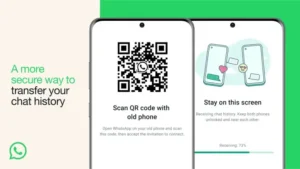
    1. WhatsApp’s Built-in QR Code Transfer (Fastest for Chats + Media)Best for:
    1. WhatsApp’s Built-in QR Code Transfer (Fastest for Chats + Media)Best for:

    WhatsApp chats, photos, videos, voice notes
    Time: 10–30 minutes
    Size limit: None
    WhatsApp added this feature in 2023 and it’s still the king in 2025.
    Step-by-Step:

    1. On your Android, open WhatsApp → Settings → Chats → Transfer Chats → “Start”
    2. On your iPhone, install WhatsApp → open → scan the QR code shown on Android
    3. Keep both phones on the same Wi-Fi → transfer starts automatically
    4. Done — all chats, media, and even voice notes appear on iPhone

    No backup, no Google Drive, no PC needed.

    2. Google One Tap Transfer (Best for Everything Else)
    2. Google One Tap Transfer (Best for Everything Else)

    Best for: Photos, videos, contacts, calendars, messages
    Time: 15–60 minutes
    Size limit: Your Google storage
    Google made this stupidly easy in 2025.
    Step-by-Step:

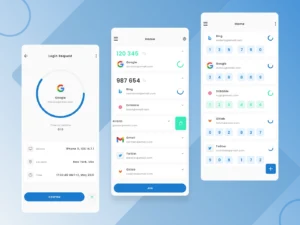
    1. On iPhone, open Settings → Passwords & Accounts → Add Account → Google
    2. Sign in with the same Google account you used on Android
    3. Turn on sync for Photos, Contacts, Calendar, Keep Notes
    4. Download Google Photos, Google Drive, and Google Keep apps → everything syncs instantly
    See also  Dangote Calls for Probe of NMDPRA Boss, Farouk Ahmed, Over Alleged $5m Swiss School Fees

    Pro tip: Use Google Photos “High quality” backup on Android first — unlimited free storage.

    3. Tenorshare iCareFone Transfer (Best for WhatsApp + Selective Files – No Reset Needed)
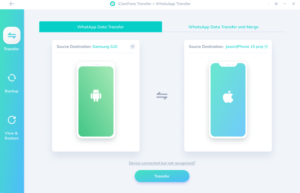
    3. Tenorshare iCareFone Transfer (Best for WhatsApp + Selective Files – No Reset Needed)

    Best for: WhatsApp + Line + selective photos/videos
    Time: 5–20 minutes
    Size limit: None (PC required)
    This tool is a lifesaver if you already set up your iPhone.
    Step-by-Step:

    1. Download iCareFone Transfer on PC/Mac (free trial)
    2. Connect both phones with USB cables
    3. Choose “WhatsApp Transfer” or “Selective Transfer”
    4. Select what you want → click Transfer
    5. Done — even works after iPhone setup!

    4. AirDrop via Mac (Best for Mac Users – Wireless & Fast)
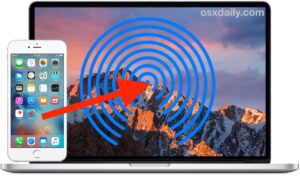
    4. AirDrop via Mac (Best for Mac Users – Wireless & Fast)

    Best for: Photos, videos, documents
    Time: 5–30 minutes
    Size limit: None
    If you have a Mac, this is pure magic.
    Step-by-Step:

    1. On Android → install “Android File Transfer” or use “OpenMTP”
    2. Connect Android to Mac → copy files to a folder
    3. Turn on AirDrop on iPhone and Mac
    4. Select files on Mac → Share → AirDrop to iPhone
    No cables, no internet.

    5. Telegram Secret Chat Trick (Best Zero-Cost Hack – Works Anywhere)
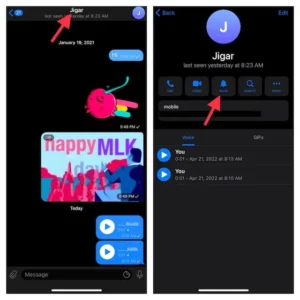
    5. Telegram Secret Chat Trick (Best Zero-Cost Hack – Works Anywhere)

    Best for: Photos, videos, documents (no size limit)
    Time: 1–10 minutes
    Size limit: Unlimited
    The legendary Telegram hack still works perfectly in 2025.
    Step-by-Step:

    1. On both phones, install Telegram and log in with the same account
    2. Open a chat with yourself (“Saved Messages”) on Android
    3. Forward or upload all files/photos/videos
    4. Open the same chat on iPhone → download everything
    See also  How Nigerians Can Save Smarter With OPay Spend & Save Feature

    Bonus: Files stay forever and can be 2GB each.

    Quick Comparison Table

    Method
    WhatsApp
    Photos/Videos
    Contacts
    Needs PC
    After iPhone Setup
    WhatsApp QR
    Yes
    Yes
    No
    No
    Yes
    Google One
    No
    Yes
    Yes
    No
    Yes
    iCareFone Transfer
    Yes
    Selective
    No
    Yes
    Yes
    AirDrop via Mac
    No
    Yes
    No
    Yes
    Yes
    Telegram Hack
    No
    Yes
    No
    No
    Yes
    Final Recommendation for 2025

    1. Start with WhatsApp QR code (must-do for chats)
    2. Use Google One for photos/contacts
    3. Use Telegram for everything else
    Total time: Under 1 hour. Zero stress.
    Which method are you trying first? Drop your switch story in the comments!
    FintechTodayNews.com P.S. Moving from iPhone to Android next? The process is even easier now — let me know if you want that guide too!
    #AndroidToiPhone #iPhoneSwitch #DataTransfer #TechTipsNigeria #WhatsAppTransfer
    (Article fully updated for 2025 methods – no outdated Move to iOS nonsense)
    Related Posts:

    • 5 interesting ways to transfer files from Android to iPhone
      interesting ways to transfer files from Android to iPhone
    • Why Your Phone Number Shows as Private in Nigeria (and How to Fix It)
      Why Your Phone Number Shows as Private in Nigeria…
    • Useful WhatsApp Features You Might Not Know
      Useful WhatsApp Features You Might Not Know
    • iPhone vs Android: A Professional, Balanced Review Based on Real User Insights
      iPhone vs Android Review Based on Real User Insights
    AirDrop Transfer Files from Android to iPhone
    Share. Facebook Twitter Pinterest LinkedIn Tumblr Email
    FinTech Today
    • Website

    Related Posts

    Best Savings Apps in Nigeria (2026 Edition)

    March 2, 2026

    Rwanda First in Africa with Nationwide Zipline Health Drone Delivery

    February 7, 2026

    Nigeria’s Major Highways Have Strong Mobile Coverage, but Gaps Persist

    February 2, 2026

    MTN MoMo Launches K5 International Transfers to UK, EU, Canada

    February 2, 2026

    Safaricom Ethiopia Crosses 12 Million Users as M-PESA Gains Traction

    February 2, 2026

    Chams Grows 17.9% in 2025 on SIM & Bank Card Demand

    February 2, 2026

    1 Comment

    1. Pingback: Interesting Ways To Transfer Files From Android To IPhone - FintechTodayNews

    Leave A Reply Cancel Reply

    MENU
    • Home
    • Fintech News
    • Startups
    • Trends & Insights
    • Cryptos
    • Banking system
    • About Us
    • Contact Us
    Recent Posts
    • Best Savings Apps in Nigeria (2026 Edition)
    • SCOA Soars 437% in 2026: N7 to N38 – What Investors Should Know
    • US Strikes on Iran: What It Means for Africa and Nigeria’s Economy

    Get ₦1,000 FREE Cash!

    Sign up with my link & get instant bonus

    Claim ₦1,000 Now →

    OPay – Free Transfers

    Unlimited free transfers + huge bonuses

    Join OPay Now →

    25 Free Transfers Monthly

    The real bank of the free

    Open Kuda Account →

    ₦500 Per Referral

    Best POS & Business App 2025

    Start Earning →

    Top Fintech Apps in Nigeria

    1. Kuda – Digital banking & budgeting

    2. FairMoney – Loans & savings

    3. OPay – Payments & wallet

    4. PalmPay – Cashless payments & bill pay

    5. Moniepoint – Business banking & POS

    6. Carbon – Loans & investments

    7. Branch – Micro-loans

    8. ALAT by Wema – Digital bank

    9. Zenith Bank App – Commercial bank digital

    10. GTWorld – Commercial bank app

    NGX + CRYPTO LIVE
    DANGCEM ₦645.00 ▲2.4% MTNN ₦212.50 ▼1.1% GTCO ₦52.80 ▲3.2% BUA FOODS ₦378.00 ▲1.8% AIRTEL ₦1,980 ▲0.9% Bitcoin $92,150 ▲5.7% Ethereum $3,840 ▲4.2%
    Updated every minute • FintechTodayNews

    Subscribe to Updates

    Get the latest creative news from FooBar about art, design and business.

    Latest Posts

    Best Savings Apps in Nigeria (2026 Edition)

    March 2, 2026

    SCOA Soars 437% in 2026: N7 to N38 – What Investors Should Know

    March 2, 2026

    US Strikes on Iran: What It Means for Africa and Nigeria’s Economy

    March 2, 2026

    Naira Closes February Stronger at N1,368.5/$ as CBN Sustains Monetary Tightening

    March 2, 2026
    Trending Posts
    Top Posts

    How Nigerians Can Save Smarter With OPay Spend & Save Feature

    December 15, 2025

    CBN Financial Inclusion & Monetary Stability at 2025 Awka Fair – Key Takeaways & Updates

    November 24, 2025

    Bank78 Launches Private Digital Bank to Transform Nigeria’s Banking

    November 29, 2025
    Don't Miss

    Best Savings Apps in Nigeria (2026 Edition)

    March 2, 2026

    1. FairMoney – Highest Potential Returns (Promo + Fixed Plans) Interest: Up to promotional ~30%…

    SCOA Soars 437% in 2026: N7 to N38 – What Investors Should Know

    March 2, 2026

    US Strikes on Iran: What It Means for Africa and Nigeria’s Economy

    March 2, 2026

    Naira Closes February Stronger at N1,368.5/$ as CBN Sustains Monetary Tightening

    March 2, 2026
    Stay In Touch
    • Facebook
    • YouTube
    • TikTok
    • WhatsApp
    • Twitter
    • Instagram
    Latest Reviews
    FinTech TodayNews
    FinTech TodayNews

    About Us
    Learn how FintechTodayNews covers Nigeria’s fintech scene – from app bonuses and startup spotlights to crypto updates and economic insights in 2025.”
    At FintechTodayNews, our news is built on real testing and community feedback. We cover the full spectrum of fintech in Nigeria: app reviews with actual bonuses, startup stories like SparkBorders, crypto rallies, NGX stock picks, and CBN policies. Every article is researched, unbiased, and designed to help you make money.

    Facebook X (Twitter) Instagram Pinterest YouTube WhatsApp

    Subscribe to Updates

    Get the latest creative news from FooBar about art, design and business.

    Most Popular

    How Nigerians Can Save Smarter With OPay Spend & Save Feature

    December 15, 2025

    CBN Financial Inclusion & Monetary Stability at 2025 Awka Fair – Key Takeaways & Updates

    November 24, 2025

    Bank78 Launches Private Digital Bank to Transform Nigeria’s Banking

    November 29, 2025
    FintechTodayNews
    Facebook X (Twitter) Instagram YouTube WhatsApp
    • Disclaimer
    • Terms & Conditions
    • DMCA / Copyright Notice
    • About Us
    • Help Center
    • Privacy Policy
    @ 2026 fintechtodaynews

    Type above and press Enter to search. Press Esc to cancel.